
RoadWarrior Route Planner
MapQuestMaps & Navigation
4.03.61K Reviews
- Version
- 2026.04.100
- Installs
- 1.00M
- Age Rating
- Everyone
Screenshots

Our Review of RoadWarrior Route Planner
 Analysis by Appyee
When I plan a day with several destinations, the hard part usually isn’t finding each address; it’s working out a sensible order, keeping the schedule realistic, and staying focused once I’m on the road. RoadWarrior Route Planner is built for that kind of work. It’s a free maps and navigation app from MapQuest, aimed especially at people who drive for work, make deliveries, or coordinate routes for a fleet. I find it most useful when a normal map’s point-to-point directions aren’t enough.
Start with the shape of your day
I’d reach for RoadWarrior before leaving, when I know the stops but haven’t settled on their order. That could mean a courier sorting deliveries, a sales representative planning customer visits, or a parent fitting errands around school pickup. Instead of treating every destination as a separate trip, the app is meant to help arrange a multi-stop route as one plan.
That distinction matters. A standard navigation app is excellent when I need directions to one place, and it may be all I need for a familiar commute. With a run of appointments spread across town, though, I want to think through the whole sequence before I start driving. The more stops there are, the more useful it becomes to see the day as a route rather than a series of disconnected searches.
Planning a route from first stop to last
First off, let’s talk about getting this app up and running. The RoadWarrior Route Planner is available on both Android and iOS, so no matter your device allegiance, you’re covered. Once you download the app, the setup is pretty straightforward. You’re greeted with a clean interface that doesn’t bombard you with unnecessary clutter. I personally appreciate an app that respects my screen real estate.
Signing up is a breeze, and you can dive right into crafting your routes. The app offers a free version with essential features, but if you’re planning to use it extensively, the premium plan might be worth considering.
Build the list before you set off
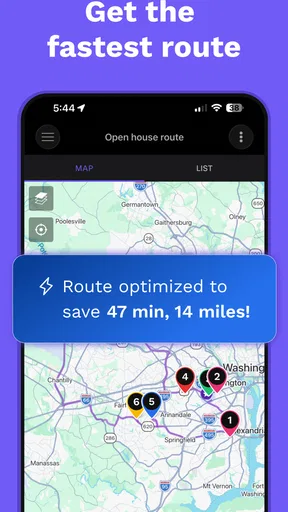
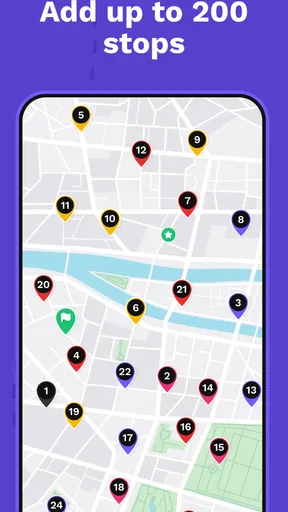
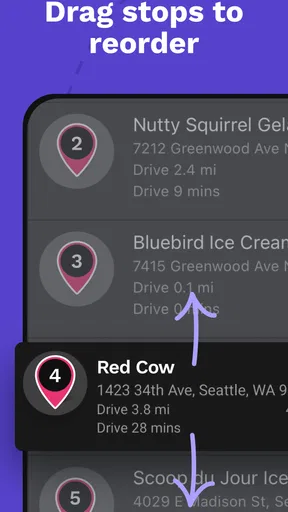
Now, let’s dig into what makes this app tick. The main draw here is its ability to optimize routes with multiple stops. You can add as many destinations as you like, and the app does the heavy lifting to order them efficiently. Perfect for delivery drivers, sales reps, or anyone who finds themselves zig-zagging across town.
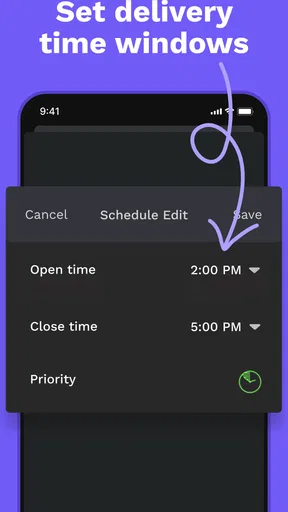
One of my favorite features is the ability to set parameters for each stop. You can allocate time windows, prioritize stops, and even integrate with your calendar. This is like having a personal assistant who’s got your back in real-time.
Those stop details are most useful when I treat them as planning constraints, not guarantees that the day will run perfectly. For example, if a customer can only receive a delivery during a particular window, marking that priority before arranging the route can help me avoid building a plan that looks tidy on a map but fails in practice. I’d also leave breathing room between appointments: a route order can’t predict every conversation that runs long or every delay after parking.
A practical habit is to check the stop list against the actual job before starting navigation. I’d confirm that each address belongs to the right visit, then look at the overall map for an obvious backtrack or awkward crossing of town. Route optimization is a useful starting point, but my local knowledge still matters. A familiar entrance, a difficult parking area, or a stop that needs extra time can change what “efficient” means for that particular day.
Hand off directions without losing the plan
Another cool aspect is the ability to sync with Google Maps or Waze. So, if you’ve got a preferred navigation app, RoadWarrior plays nice with it. No more switching back and forth, which is a huge plus in my book.
In a working routine, that handoff is a meaningful division of labor: RoadWarrior helps organize the sequence, while the navigation app handles the turn-by-turn trip to the next destination. I’d review the next stop before passing directions across, especially when several addresses look similar or a customer has a specific arrival window. It’s a small pause that can prevent following the right route to the wrong door.
The switch between apps is not completely invisible. I did notice that while the app integrates well with other navigation apps, it occasionally takes a second to switch over. For a planned delivery run, that brief delay is minor; if I’m already moving, I’d rather wait until I’m safely stopped than try to manage the handoff while driving. Keeping the phone interaction to the start of a leg makes the workflow calmer and safer.
For a small business, the route can also serve as a shared plan in a practical, human sense: a driver can work through an ordered list, while a dispatcher or colleague can discuss changes to the day. I wouldn’t assume that route planning alone handles every fleet process. The value here is in making the sequence easier to reason about, not in replacing communication when a delivery is delayed or a customer changes arrangements.
What the map tells me—and what it can’t
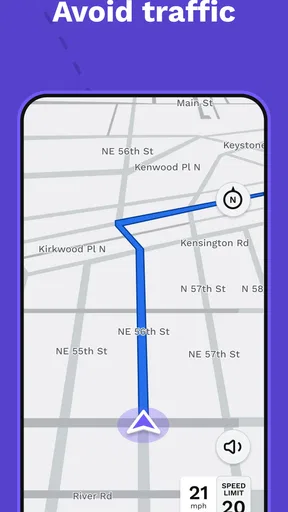
Let’s talk about the user experience. The interface is intuitive, and I didn’t find myself lost in a sea of buttons or tabs. It’s all laid out logically. The map view is especially handy, giving you a bird’s-eye view of your day’s journey, complete with traffic conditions and estimated times of arrival.
That overview is useful before departure because it helps me spot a route that looks needlessly scattered. During the day, traffic conditions and estimated arrival times offer context, but I’d treat them as guidance rather than promises. A map can show the route and the timing estimate; it can’t know how long a handover will take, whether a building entrance is hard to find, or how much time I’ll spend looking for a legal place to stop.
While playing around, I did notice that the app runs smoothly without lag. This is crucial, especially when you’re on the go. The last thing you need is an app that chokes just when you need it the most.
For a realistic day, imagine a courier with a morning set of deliveries, one recipient who needs a narrower arrival window, and a final pickup across town. I’d enter the destinations, apply the relevant stop priorities or windows, inspect the proposed order, then send the first leg to my preferred navigation app. After each delivery, I’d return to the planned route and move on. That rhythm is more useful than trying to remember a long list or repeatedly typing addresses into a general-purpose map.
Where it fits among navigation choices
I’ve used a fair share of route planners, and RoadWarrior definitely ranks up there with the best. The app’s ability to handle complex routes efficiently is impressive. I didn’t have to worry about arriving late to any of my stops, and that peace of mind is invaluable.
Compared with using Google Maps or Waze alone, the main reason I’d choose RoadWarrior is the multi-stop planning workflow and the ability to hand off navigation to those apps. If I’m going to one destination, opening my usual map is simpler. If I have a sequence of work stops to organize, planning them together is the stronger fit. The trade-off is an extra planning step and a brief app switch, so it may feel unnecessary for an occasional errand or a short, familiar route.
It’s also worth setting expectations about the business side. The app is free to download, but it includes in-app purchases, with listed items ranging from $4.99 to $99.99. I’d start with the free option and judge it against the way I actually work: how often I plan multi-stop days, whether stop details help, and whether the route handoff saves enough effort. A frequent driver may find paid options worth exploring, while someone planning only a few weekend stops may not need to spend anything.
RoadWarrior has an average rating of 4.1 from around 10,000 ratings, and it has been installed over a million times. Those figures suggest an established audience, but I wouldn’t use popularity as a substitute for testing the workflow that matters to me. The app is rated for Everyone, and its current version is 2025.06.230; it requires Android 7.0 or later. It was released on August 4, 2013, so it has been around for years, but what matters most is whether its current route-planning approach suits my day.
Who should use it, and when I’d choose something else
My personal take is that RoadWarrior makes the most sense for couriers, field sales workers, service professionals, and small teams that regularly visit several places in one shift. It can also help a busy household when errands need to be grouped in a sensible order, though those users may not need a dedicated route planner every day. The more often I repeat multi-stop planning, the more valuable it becomes to have the list and route organized before I pull away.
I’d skip it if my usual need is simply finding a nearby place or navigating a single trip. I’d also be cautious about adopting it as the entire operating system for a large fleet without first checking whether the way it handles routes matches the team’s dispatch and communication needs. A route tool can organize destinations, but real operations still depend on clear updates when plans change.
One useful test is to plan a representative day rather than a perfect one: include the stops that genuinely have timing constraints, inspect the sequence, and see whether the handoff to your navigation app feels natural. If the process reduces repeated address entry and makes the route easier to follow, it is doing useful work. If you spend more time maintaining the plan than driving it, a simpler map or a different workflow may suit you better.
My personal take
However, no app is without its quirks. I did notice that while the app integrates well with other navigation apps, it occasionally takes a second to switch over. It’s not a deal-breaker by any means, but something to keep in mind.
That small pause is also a reminder to decide how I want to work before the day begins. If I prefer Google Maps or Waze for turn-by-turn directions, I can keep using that familiar navigation while letting RoadWarrior organize the stops. If I don’t need several destinations or scheduling details, adding another app to the routine may create more friction than value. The best choice depends less on the number of features and more on whether multi-stop planning is a regular problem for me.
Wrapping Up
All in all, if you’re in the market for a reliable route planner that can handle multiple stops without breaking a sweat, RoadWarrior Route Planner is worth checking out. It’s user-friendly, packed with features, and keeps you on schedule like a pro.
So, give it a whirl and see how it fits into your routine. Whether you’re a delivery driver, a busy parent, or just someone who loves to plan efficiently, this app might just become your new favorite travel companion. Happy routing!
Verdict
Strengths of RoadWarrior Route Planner
- Optimizes routes for multiple stops efficiently.
- User-friendly interface with intuitive design.
- Integrates with Google Maps seamlessly.
- Offers real-time traffic updates and alerts.
- Customizable settings for personalized routes.
Limitations of RoadWarrior Route Planner
- Premium features require a subscription.
- Limited offline functionality available.
- Occasional syncing issues with calendar apps.
- May drain battery with prolonged usage.
- Interface can lag on older devices.
Other Releases by MapQuest
View All
MapQuest: Get Directions
Maps & Navigation4.4
Similar Picks in This Category
View All
Uber - Request a ride
Uber Technologies, Inc.4.7


inDrive. Rides with fair fares
® SUOL INNOVATIONS LTD4.8

Yandex Go: Taxi Food Delivery
Mikromobilnost LLC Belgrade4.8

Bolt: Request a Ride
Bolt Technology4.8

Rapido: Bike-Taxi, Auto & Cabs
Rapido Bike Taxi4.8
Frequently Asked Questions
What is RoadWarrior Route Planner used for?
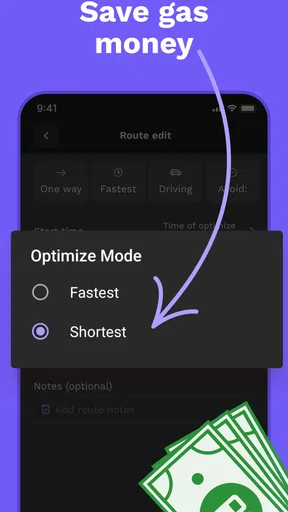
RoadWarrior Route Planner is designed to optimize route planning for delivery drivers, sales teams, or anyone needing efficient navigation between multiple locations. It helps users save time and fuel by providing the most efficient route based on real-time traffic data and personal preferences.
Can I use RoadWarrior Route Planner offline?
RoadWarrior primarily relies on an internet connection to provide real-time traffic updates and optimal routing. However, once a route is planned, it can be accessed offline. Keep in mind that without internet access, the app may not update for changes in traffic or road conditions.
How many stops can I include in a single route?
The app allows users to add multiple stops on a single route, making it ideal for delivery drivers or anyone with complex travel itineraries. The exact number of stops may depend on your subscription plan, with premium options offering the ability to add more stops.
Is RoadWarrior Route Planner free to use?
RoadWarrior offers both free and premium versions. The free version includes basic route planning features, while the premium version provides advanced functionalities such as unlimited stops, priority customer support, and enhanced optimization options. Users can choose based on their specific needs.
Does RoadWarrior Route Planner integrate with other apps?
Yes, RoadWarrior integrates with various navigation apps like Google Maps and Waze, allowing users to navigate their optimized routes seamlessly. This integration helps users leverage familiar navigation tools while benefiting from RoadWarrior’s advanced route optimization features.
